Bulk Upload Data
Bulk Upload Bundles
Credence enables a bulk upload of bundles to facilitate period-end adjustments and trigger events for high-volume journal impact (e.g. Closing Statement at the time of asset acquisition).
As needed, download the bundle template and populate with the set of adjustment ledger entries. Instructions for properly formatting the data is within the template. Upon upload, the set of bundles will be created in Credence as drafts. Users with permission can then review, validate, and bulk approve the set.
Upload a Yardi General Ledger
Credence enables a direct upload of a GL file downloaded from Yardi. This feature should be used to ingest financial data for assets that are not actively managed within Credence.
* Note: Uploading a GL in this manner will overwrite an asset’s existing bundles that occur within the accounting periods present in the upload file for each property.
-
Download the GL Financial Packet from Yardi.
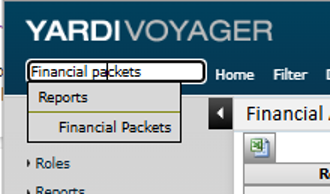
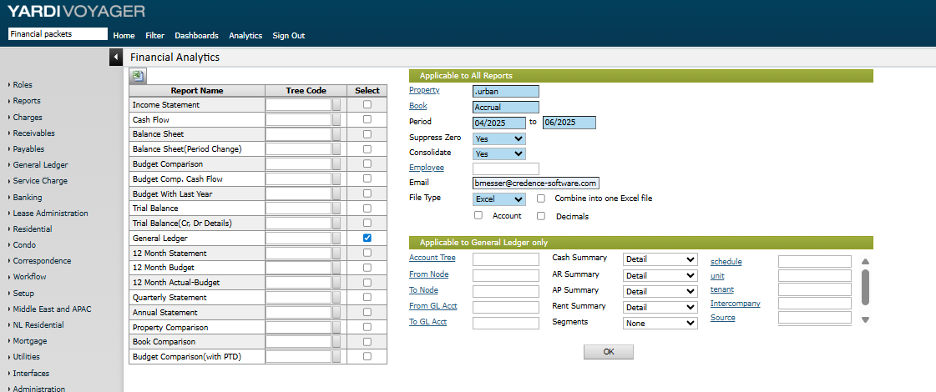
- Search 'Financial Packets' in the search bar at the top left of the screen and click on the 'Financial Packets' option. Fill in the report as per selections in screenshot below, choosing the property list and periods to be sent to the specified email address.
-
Within Credence, navigate to the Bulk Upload page and go to the Upload Journal from Yardi tab.
- Upload the Yardi file downloaded from Step 1
- Bundles will be created and can be reviewed in the journal and financial reports
- If any new accounts were created in the COA based on records in the uploaded file, the user will be notified and these accounts should be mapped to the Credence COA